Flight simulator hardware can dramatically improve the realism and enjoyment of Microsoft Flight Simulator 2024.
While the simulator can certainly be flown with a keyboard or standard game controller, dedicated flight controls create a far more immersive and natural flying experience.
One of the most popular hardware upgrades for beginners is a quality joystick. Joysticks provide much smoother and more precise aircraft control compared to a keyboard, especially during takeoff and landing.
Many simmers eventually move to a full yoke system, which more closely replicates the controls found in real aircraft such as the Cessna 172 or larger airliners.
Throttle quadrants are another important addition. These allow pilots to control engine power more accurately and make multi-engine aircraft much easier to manage.
Many throttle systems also include switches and levers for flaps, spoilers, landing gear, and autopilot functions, adding even more realism to the cockpit experience.
Audio equipment such as quality speakers or aviation-style headsets can further enhance immersion by improving engine sounds, ATC communication, and environmental effects.
If you are just getting started with Microsoft Flight Simulator, one of the first questions you will probably ask is simple: what joystick should I buy?
The good news is that you do not need to spend a fortune to enjoy flight simulation. A good beginner joystick can make flying smoother, easier, and far more enjoyable than using only a keyboard, mouse, or game controller. This guide is written for new sim pilots who want a practical, sensible starting point without getting buried in complicated hardware choices.
Why a Joystick Makes Flight Simulator Easier
You can fly Microsoft Flight Simulator with an Xbox controller, keyboard, or mouse, but a joystick gives you much finer control over the aircraft. That matters most during takeoff, landing, turns, and small corrections in flight.
With a joystick, the aircraft starts to feel less like a game and more like something you are actually controlling. Pitch, roll, rudder, and throttle inputs become more natural. Instead of tapping keys or nudging a small thumbstick, you can make smoother movements with your hand.
For beginners, that smoother control is very important. Most new sim pilots tend to over-control the aircraft. They pull back too much, bank too sharply, or chase the runway during landing. A decent joystick helps reduce that because your hand movements are larger and more gradual.
Real Pilot Tip: In real flying, smoothness matters. Whether you are flying a small Cessna or a large airliner, gentle control inputs are usually better than sudden ones. A joystick helps beginners build that habit early.
What Beginners Should Look For in a Flight Sim Joystick
Before choosing a joystick, it helps to know what actually matters. Beginners are often tempted by the biggest and most complicated setup, but that is not always the best place to start.
1. Twist Rudder Control
A twist grip lets you control the rudder by rotating the joystick handle left and right. This is very useful if you do not have separate rudder pedals.
The rudder is used for steering on the ground, keeping the aircraft straight during takeoff, and making coordinated turns. You can fly without pedals, but having twist rudder built into the joystick makes life much easier.
2. A Built-in Throttle
A small throttle lever on the joystick base is very handy. It lets you control engine power without needing a separate throttle quadrant.
For beginners, this is ideal. You can learn the basics first, then add more advanced hardware later if you want to.
3. Enough Buttons, But Not Too Many
A joystick with programmable buttons is useful because you can assign common controls such as flaps, landing gear, brakes, trim, view controls, and autopilot shortcuts.
However, more buttons are not always better for beginners. Too many controls can become confusing. The best beginner joystick gives you enough flexibility without feeling like a cockpit from day one.
INSERT SUPPORTING IMAGE HERE (Approx 1/3 down article)
Image Description:
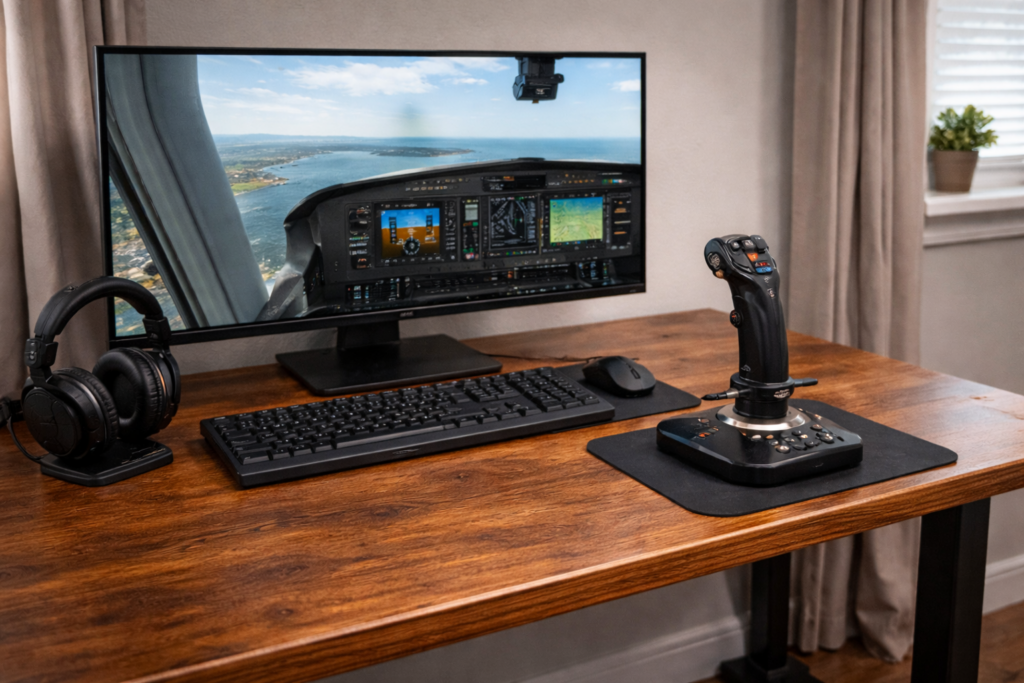
A clean, realistic flight simulator desk setup with a beginner joystick in the foreground, Microsoft Flight Simulator running on the monitor, soft daylight, elegant modern aviation setup, realistic but not dark.
This sounds simple, but it matters. A joystick that slides around the desk can be frustrating, especially during landing. A weighted or stable base helps keep everything steady.
5. Easy Setup
For a first joystick, plug-and-play simplicity is a big advantage. You want something that works well with Microsoft Flight Simulator without spending hours mapping every control.
Best Overall Beginner Choice: Logitech Extreme 3D Pro
For many beginners, the Logitech Extreme 3D Pro remains one of the easiest joysticks to recommend. It has been around for a long time, but that is part of its appeal. It is simple, affordable, widely available, and gives new sim pilots the main controls they need without overcomplicating things.
The Logitech Extreme 3D Pro includes twist rudder control, a throttle slider, an 8-way hat switch, and 12 programmable buttons. That gives beginners enough control for general aviation, sightseeing flights, basic airliner flying, and learning the fundamentals of Microsoft Flight Simulator.
It is not a premium joystick, and it does not feel like expensive flight sim hardware. But as a first joystick, it makes a lot of sense. You can learn to fly, practise approaches, enjoy scenic flights, and work out whether flight simulation is something you want to invest more money into later.
Why it suits beginners
Simple and easy to understand
Includes twist rudder control
Has a built-in throttle slider
Enough buttons for common flight sim controls
Usually much cheaper than larger HOTAS setups
Good starting point before upgrading later
Best Modern Beginner Joystick: Turtle Beach VelocityOne Flightstick
The Turtle Beach VelocityOne Flightstick is a more modern option and feels more feature-rich than the older Logitech joystick. It is designed for both PC and Xbox users, which makes it especially appealing if you use Microsoft Flight Simulator on Xbox Series X|S as well as PC.
This joystick includes a lot more controls than many basic sticks, including multiple programmable buttons, throttle controls, an 8-way hat switch, and a small display. It also has a more modern design and can suit people who want a joystick that will last them further into their flight sim journey.
For a complete beginner, it may look slightly busier at first. But if you are comfortable learning a few extra controls, it can be a very capable first joystick.
INSERT SUPPORTING IMAGE HERE (Approx 2/3 down article)
Image Description:
Close-up realistic image of a beginner flight simulator joystick showing throttle lever, programmable buttons, twist rudder grip, and hat switch with clean modern lighting and aviation-themed styling.
Best Airbus-Style Beginner Joystick: Thrustmaster TCA Sidestick Airbus Edition
If you enjoy flying Airbus aircraft in Microsoft Flight Simulator, the Thrustmaster TCA Sidestick Airbus Edition is a very attractive beginner option. It is styled after the Airbus sidestick, which makes it feel right at home when flying aircraft such as the A320.
This joystick is also a good match for sim pilots who prefer airliners over small general aviation aircraft. It gives you a more aviation-themed experience without jumping straight into a full cockpit setup.
HOTAS stands for “Hands On Throttle And Stick.” It usually means you get a separate joystick and throttle unit. This can be more immersive, especially for combat aircraft, jets, and more advanced sim setups.
However, I would not automatically recommend a full HOTAS system to every beginner. A HOTAS takes up more desk space, costs more money, and can add complexity before you really know what you need.
If you are just starting out, a single joystick with twist rudder and a small throttle control is usually enough. Once you know what aircraft you enjoy flying, it becomes much easier to decide whether you need a separate throttle, rudder pedals, yoke, or more advanced controls.
Joystick vs Yoke: Which Is Better for Beginners?
This is a common question. A yoke feels more realistic for aircraft like a Cessna 172, Beechcraft, or Boeing-style airliner. A joystick feels more natural for fighter jets, Airbus aircraft, helicopters, and many modern aircraft.
For beginners, a joystick is often the better first purchase because it is smaller, cheaper, easier to set up, and more versatile. You can use one joystick across many different aircraft types.
A yoke is wonderful if you know you mainly want to fly general aviation or Boeing-style aircraft, but it is not essential when you are starting out.
Real Pilot Tip: Do not worry too much about perfectly matching the real aircraft controls at the beginning. Learning attitude, power, trim, and smooth control is far more important than having a perfect cockpit setup.
Summary
The best flight sim joystick for beginners is the one that makes flying easier without making your setup more complicated than it needs to be.
For most new sim pilots, a simple joystick with twist rudder, throttle control, and a few programmable buttons is the ideal starting point. The Logitech Extreme 3D Pro is still a sensible budget-friendly choice, the Turtle Beach VelocityOne Flightstick is a strong modern option, and the Thrustmaster TCA Sidestick Airbus Edition is excellent for anyone who wants an Airbus-style experience.
Start simple, learn the basics, and upgrade later when you know what kind of flying you enjoy most.
Flight simulator hardware has come a very long way over the past few decades. What once required expensive professional simulators can now be experienced at home with modern software like Microsoft Flight Simulator 2024.
But while the software itself is incredibly advanced, the hardware you use to control the aircraft can make an enormous difference to the overall experience.
Flying with a keyboard or a basic game controller may let you get airborne, but it rarely captures the feeling of actually flying an aircraft. Dedicated flight simulator controls, on the other hand, bring a level of realism and precision that transforms the simulator into something much closer to a true training environment.
In this guide, we’ll explore the full range of hardware available for flight simulation, including:
Flight yokes
Joysticks and HOTAS systems
Rudder pedals
Throttle quadrants
Instrument panels and switches
Head tracking and VR
Monitor setups
Complete cockpit builds
Whether you’re building a simple beginner setup or planning a full home cockpit, this guide will help you understand what equipment is available and how it can improve your flying experience.
Understanding Flight Simulator Hardware
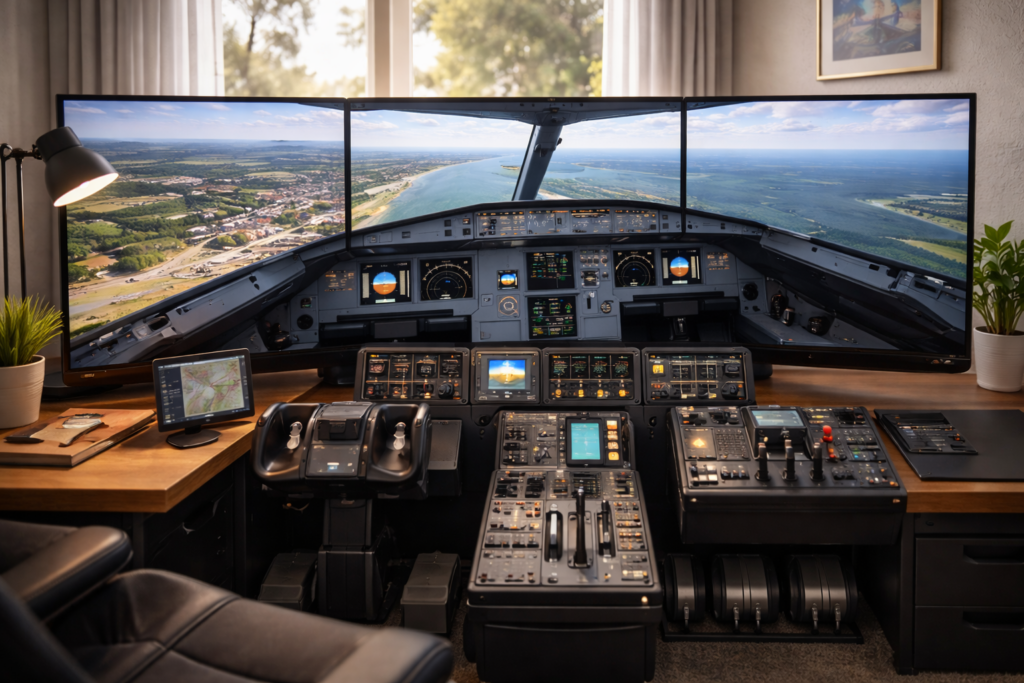
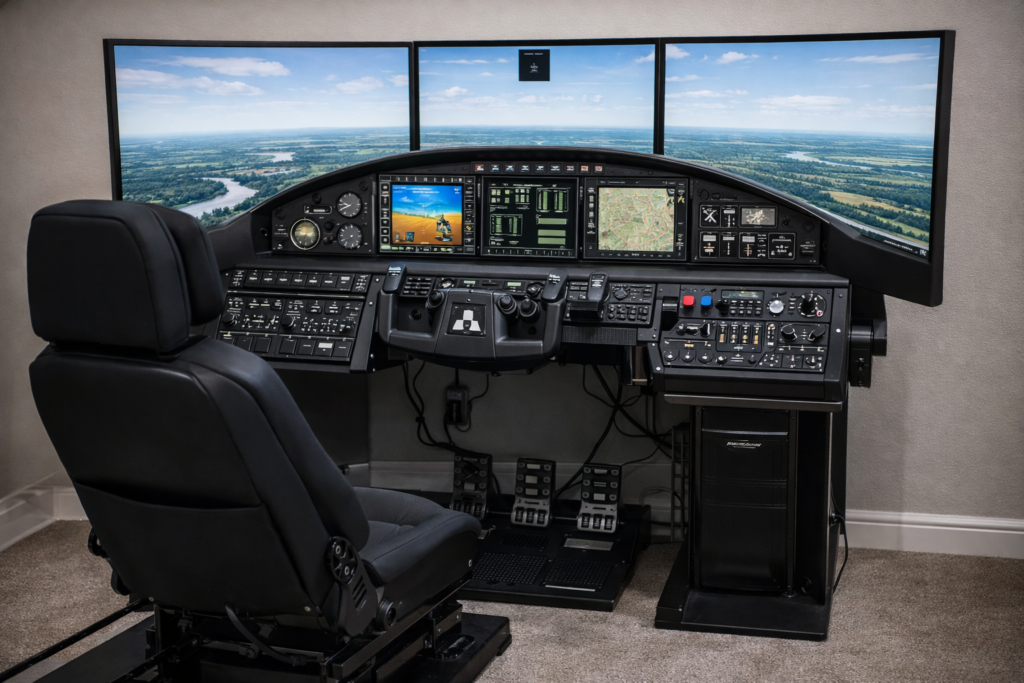
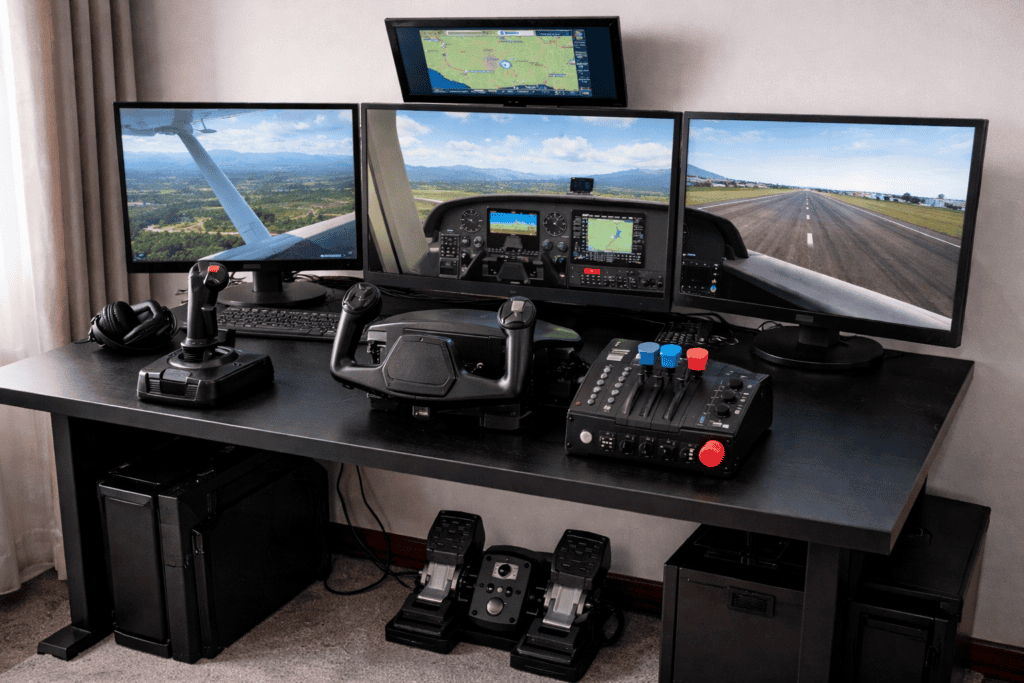
High-quality flight simulation cockpit featuring triple monitors for enhanced MSFS 2024 graphics and performance.
Before looking at specific devices, it helps to understand how flight simulator hardware is usually organised.
Most flight simulation setups are built around a few core components that replicate the primary controls found in real aircraft.
These components can then be expanded over time as your interest in simulation grows.
Primary Flight Controls
The most important devices are the ones that control the aircraft’s movement.
These include:
Yokes
Joysticks
Rudder pedals
Together, these replicate the three primary flight axes used to control an aircraft.
In real aircraft, these inputs must be coordinated carefully, particularly during takeoff, landing, and crosswind conditions. Using proper flight controls in a simulator makes those manoeuvres feel much more natural.
Power and Engine Controls
The next category of hardware controls engine power.
These devices include:
Throttle quadrants
Jet throttles
Propeller and mixture controls
In piston aircraft, throttle quadrants often include multiple levers controlling throttle, propeller pitch, and fuel mixture.
Jet aircraft typically use dual throttles and sometimes additional switches for engine management.
Using a proper throttle system allows far finer control over aircraft speed and climb performance.
Secondary Panels and Controls
Once the primary controls are in place, many enthusiasts begin adding extra panels that replicate real cockpit systems.
Examples include:
Autopilot panels
Radio stacks
Switch panels
Landing gear controls
Trim wheels
These devices let you interact with cockpit systems without constantly reaching for the mouse.
They are not strictly necessary for beginners, but they add a tremendous amount of immersion.
Display and Visual Systems
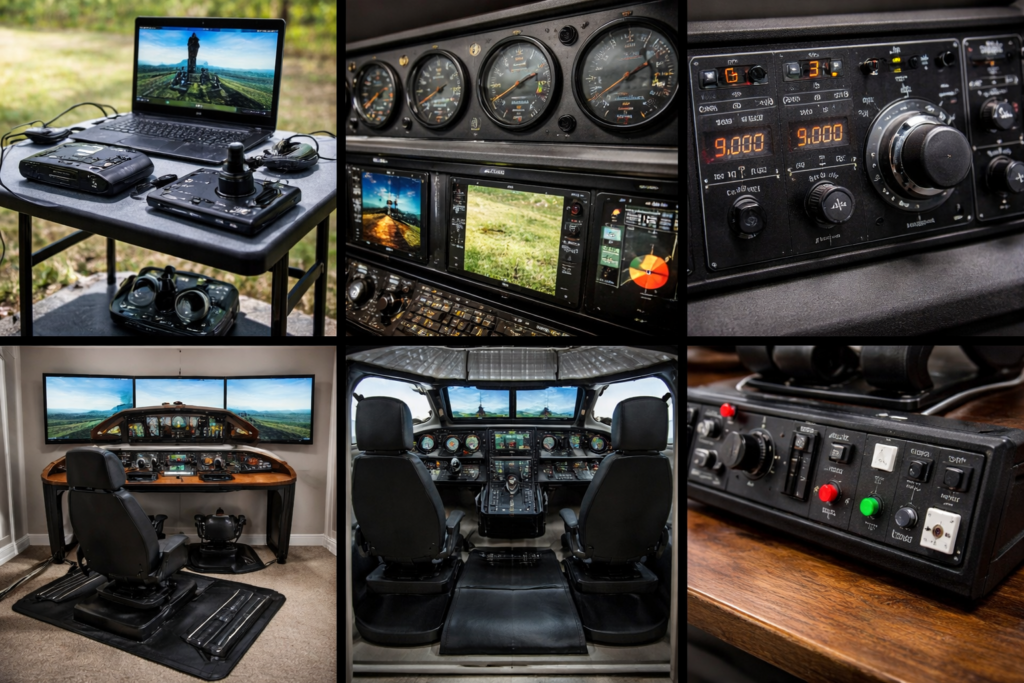
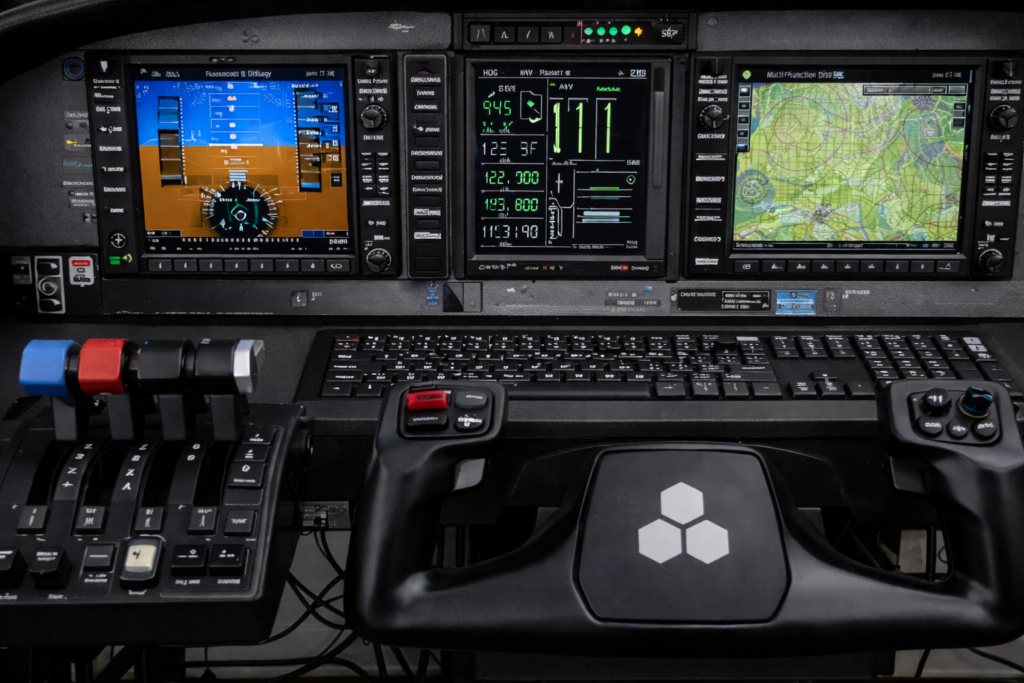
Showcasing professional flight simulator controls and cockpit equipment.
Because many civilian aircraft use yokes, they are often the preferred choice for pilots who enjoy realistic airline routes or general aviation flying in Microsoft Flight Simulator 2024.
Advantages of Using a Yoke
Realistic Airliner Flying
If you enjoy flying airliners such as the Boeing 737 or turboprops, a yoke closely matches the controls used in those aircraft.
This makes procedures like takeoff rotation, trimming, and the landing flare feel much more natural.
Comfortable Long Flights
Because the control wheel sits directly in front of you, many pilots find yokes comfortable for longer flights.
You can rest your hands on the yoke in a more relaxed position compared with holding a joystick for long periods.
Multiple Switches and Buttons
Many modern yokes include programmable switches that can control functions such as:
Taxiing becomes far easier when you can steer with your feet instead of using keyboard commands.
Improved Landing Control
Crosswind landings often require precise rudder adjustments to keep the aircraft aligned with the runway.
Pedals make these corrections far smoother.
Popular Rudder Pedals
Some commonly used flight simulator rudder pedals include:
Thrustmaster TPR Pendular Rudder
Logitech G Pro Flight Rudder Pedals
These devices connect directly to the simulator and allow precise rudder control using natural foot movements.
Throttle Quadrants and Engine Controls
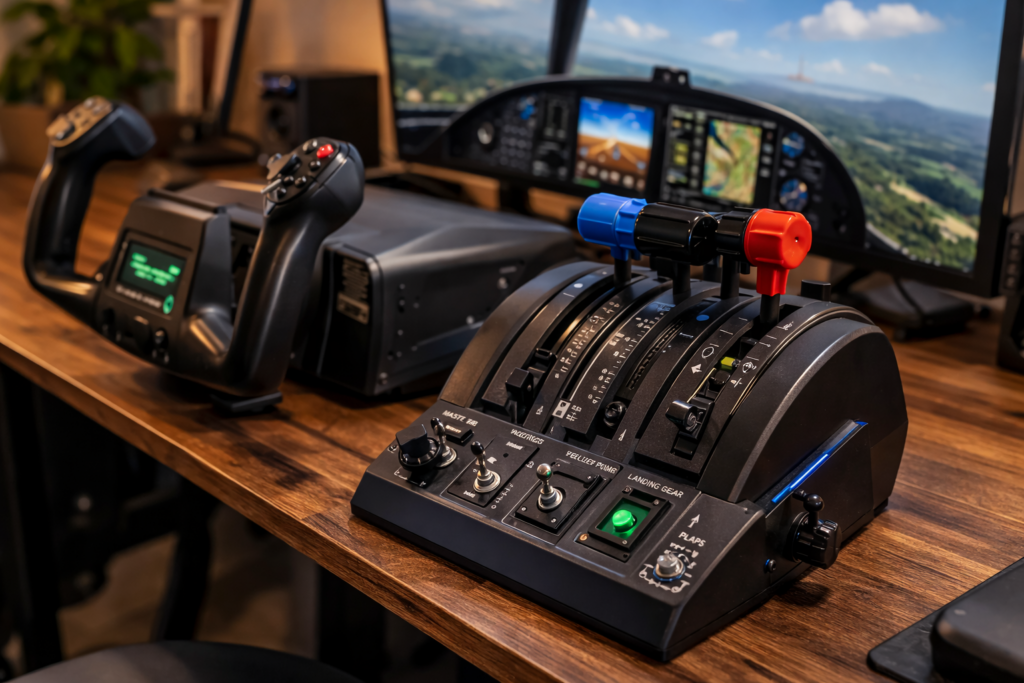
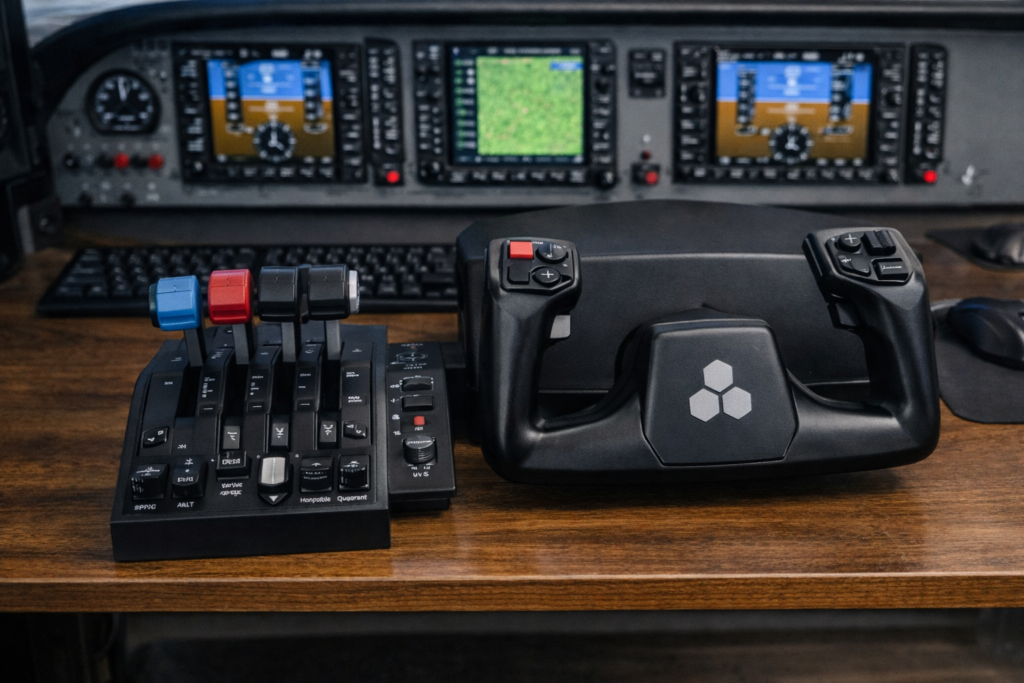
Yoke and the throttle quadrant
While the yoke or joystick controls the direction of the aircraft, the throttle controls the aircraft’s power. In many ways, throttle management is just as important as steering the aircraft itself.
In real aircraft, pilots constantly adjust power during flight. Throttle inputs control:
Climb performance
Descent rate
Cruise speed
Approach stability
Landing flare
Trying to control power with a keyboard or mouse can feel very unnatural. A dedicated throttle system allows small and precise adjustments that make flying far smoother and more realistic.
What a Throttle Quadrant Does
A throttle quadrant replicates the engine control levers found in real aircraft.
Depending on the aircraft type, these levers may control:
Throttle (engine power)
Propeller pitch
Mixture control
Reverse thrust
For piston aircraft, three levers are typically used: throttle, propeller, and mixture.
In jet aircraft, the throttle quadrant often includes dual throttle levers to control each engine independently.
Having these physical controls allows pilots to manage power far more accurately than when using digital keyboard commands.
Why Throttle Control Matters in Flight Simulation
Power management is essential during several key phases of flight.
Takeoff
During takeoff, the pilot must smoothly advance the throttle while maintaining directional control.
A physical throttle allows gradual power increases that feel very similar to real aircraft procedures.
Climb and Cruise
Maintaining the correct power setting during climb and cruise improves fuel efficiency and engine performance.
Throttle quadrants make these adjustments simple and intuitive.
Landing
Approach and landing require constant small power adjustments.
A proper throttle makes it far easier to control descent rate and airspeed.
Many simulator pilots find that once they start using a dedicated throttle system, they never want to go back to keyboard controls.
Flight Simulator Panels and Switches
An immersive flight simulation hardware setup featuring multiple screens, controls, and instruments.
Once the primary flight controls are in place, many enthusiasts begin expanding their setup with additional cockpit panels and switches.
These devices replicate the instrument panels found in real aircraft and allow pilots to control systems without relying on the mouse.
Panels commonly replicate:
Autopilot controls
Radio communication systems
Navigation systems
Landing gear switches
Trim wheels
While these accessories are not necessary for beginners, they significantly increase immersion and realism.
Autopilot Panels
Autopilot panels allow you to control the aircraft’s autopilot functions using physical knobs and buttons.
Typical controls include:
Altitude selection
Vertical speed
Heading
Autopilot engagement
Using physical controls for these systems feels far more natural than clicking virtual knobs in the cockpit.
Radio and Navigation Panels
Radio panels replicate the communication and navigation radios used in real aircraft.
They allow pilots to adjust:
Communication frequencies
Navigation frequencies
Standby frequencies
These panels are particularly useful for pilots who enjoy realistic IFR flying.
Switch Panels
Switch panels typically include controls for systems such as:
Landing lights
Taxi lights
Landing gear
Battery and avionics switches
Although these functions can be controlled with a mouse, dedicated switches add a great deal of immersion.
Many simulator enthusiasts enjoy performing full cockpit procedures during startup and shutdown, and physical switches make those procedures feel much more authentic.
Head Tracking vs Virtual Reality
VR flight simulation Headset
Two popular technologies are used for this:
Head tracking
Virtual reality
Both let you look around the cockpit naturally, rather than using keyboard commands.
Head Tracking
Head tracking systems monitor small head movements and translate them into camera movements within the simulator.
A well-known example is TrackIR.
With head tracking enabled, turning your head slightly to the left allows you to look out the side window. Looking up lets you see the overhead panels.
This creates a very natural way to explore the cockpit environment.
Many pilots prefer head tracking because it allows them to remain aware of their keyboard, flight controls, and instrument panels while still enjoying free-look capability.
Virtual Reality
Virtual reality takes immersion even further.
Instead of looking at a monitor, VR headsets place you directly inside a fully rendered cockpit environment.
Popular VR devices include the Meta Quest 3.
With VR enabled, pilots can:
Look around the cockpit naturally
Judge depth and distance more accurately
Feel as though they are sitting inside the aircraft
However, VR also has some limitations. Wearing a headset can make it harder to see physical controls, and some users experience discomfort during longer sessions.
For this reason, many simulator pilots experiment with both head tracking and VR to decide which experience they prefer.
Monitor and Display Setups
Immersive flight simulation hardware with triple screens and professional controls for a realistic flying experience.
Ultra-wide monitors provide a much wider field of view than standard displays.
This allows pilots to see more of the cockpit and the surrounding environment without adding additional monitors.
For many flight simulation enthusiasts, an ultra-wide display is an excellent upgrade.
Multi-Monitor Setups
More advanced setups sometimes include two or three monitors placed side-by-side.
This creates a panoramic view of the outside world and dramatically increases immersion.
Triple-monitor configurations are particularly popular among enthusiasts who enjoy realistic cockpit environments.
Expanding Your Flight Simulator Setup
Ultimate home flight simulation setup with triple monitors and realistic controls.
One of the most enjoyable aspects of flight simulation is that your setup can evolve.
Many enthusiasts begin with a simple joystick and eventually expand their equipment to include:
Throttle quadrants
Rudder pedals
Panels and switches
Head tracking or VR
Multi-monitor displays
Gradually building your setup allows you to improve realism without needing to purchase everything at once.
Each new component adds another layer of immersion and control.
Best Beginner Flight Simulator Setup
A professional flight simulation setup featuring a large monitor, joystick, and throttle for realistic flying practice.
Many people who are new to flight simulation assume they need a room full of equipment to enjoy the experience. The reality is much simpler. A basic setup can provide a very enjoyable flying experience without costing a fortune.
For beginners, the goal should be simplicity and control precision, rather than trying to replicate a full cockpit immediately.
A good beginner setup usually includes:
A joystick or entry-level yoke
A single monitor
A comfortable desk setup
Keyboard shortcuts for secondary controls
This configuration allows you to focus on learning how aircraft behave and how the simulator works.
Many new simulator pilots start with a joystick because it requires less desk space and is relatively affordable. A good joystick can provide precise control and work well across many different aircraft types.
Once you become more comfortable with the simulator, you may begin adding extra hardware such as rudder pedals or throttle quadrants.
Modern simulators like Microsoft Flight Simulator 2024 provide excellent flying experiences even with a simple control system.
Mid-Range Flight Simulator Setup
After spending some time flying, many enthusiasts begin upgrading their equipment to improve realism and control.
A mid-range setup often includes dedicated flight controls that better replicate the layout of real aircraft.
Typical components include:
A flight yoke or advanced joystick
Rudder pedals
A throttle quadrant
Head tracking
A large monitor or ultra-wide display
This type of setup dramatically improves the flying experience. Rudder pedals allow coordinated turns and more realistic taxi control. A throttle quadrant provides smoother power adjustments, and head tracking allows you to look around the cockpit naturally.
Many enthusiasts find that this level of hardware provides an excellent balance between realism and practicality.
It also represents the point where flight simulation begins to feel much closer to operating a real aircraft.
Companies such as Next Level Racing produce cockpit frames specifically designed for flight simulation.
These frames allow controls, monitors, and panels to be mounted in positions similar to real aircraft cockpits.
Advanced setups are particularly popular among pilots who enjoy highly realistic procedures such as:
IFR flying
Airline operations
Long-haul flights
Aircraft system simulation
While these setups require more space and investment, they can create an incredibly immersive experience.
For many aviation enthusiasts, building and refining a simulator cockpit becomes a hobby in its own right.
Hardware Advice From a Real Pilot’s Perspective
One of the most common questions people ask when building a flight simulator is: “What hardware should I buy first?”
The answer often depends on how you intend to use the simulator.
From a practical flying perspective, the most important elements are control precision and smooth inputs.
In real aircraft, small control movements can have significant effects on the aircraft’s behaviour. Having proper flight controls in a simulator allows you to make those small corrections much more naturally.
If you are upgrading your setup gradually, the following order usually provides the biggest improvements.
First, upgrade the primary flight control. This means replacing keyboard or controller inputs with either a yoke or a joystick.
Second, add rudder pedals. These improve taxiing, coordinated turns, and crosswind landings.
Third, add a throttle quadrant to allow more precise power control.
After these core controls are in place, additional equipment such as panels, head tracking, or multi-monitor setups can further enhance the experience.
For most pilots, those three core controls — flight control, pedals, and throttle — create the biggest leap in realism.
Frequently Asked Questions
Do you need rudder pedals for a flight simulator?
Rudder pedals are not strictly required, but they greatly improve realism. They allow proper coordinated turns, better taxi control, and more accurate crosswind landings.
Is a yoke better than a joystick?
Neither control system is universally better. Yokes are commonly used in general aviation aircraft and airliners, while joysticks are often preferred for fighter aircraft and helicopters.
The best choice depends on the type of aircraft you enjoy flying.
Is VR worth it for flight simulation?
Virtual reality can provide an extremely immersive experience because it places you directly inside the cockpit environment. However, some pilots prefer head tracking because it allows them to see their physical controls more easily.
What computer hardware is required for flight simulation?
Modern simulators can be demanding, particularly graphically intensive ones like Microsoft Flight Simulator 2024. A reasonably powerful PC with a modern graphics card will provide the best experience, especially if you plan to use high graphics settings or VR.
Final Thoughts
Flight simulation is one of the most rewarding hobbies for aviation enthusiasts. With modern simulators and dedicated hardware, it is now possible to experience an incredibly realistic flying environment from home.
The most important thing to remember when building a flight simulator setup is that you can start simple and expand gradually.
Even a basic control setup can provide an enjoyable and immersive flying experience. Over time, additional hardware such as rudder pedals, throttle systems, and cockpit panels can transform that simple setup into something much more advanced.
Whether you are flying short scenic routes or planning long-haul airline operations, the right hardware can make your simulator feel far closer to the experience of real flight.
Choosing the right flight controls can dramatically improve your experience in Microsoft Flight Simulator. While the simulator can be flown using a keyboard, mouse, or game controller, a dedicated joystick gives you much more precise control and a far more immersive flying experience.
Joysticks are often the easiest and most affordable way to begin building a flight simulation setup. They provide intuitive control over pitch, roll, and yaw, and many models include additional buttons, throttles, and programmable switches that allow you to manage important flight functions without constantly using the keyboard.
In this guide, we will explore how joysticks work in Microsoft Flight Simulator, what features matter most, and what types of joystick setups are best suited for different styles of flying.
Why Many Flight Sim Pilots Use a Joystick
For many beginners, a joystick is the most natural way to control an aircraft in Microsoft Flight Simulator. The movement of the stick directly mirrors the control inputs used in many real aircraft, allowing you to manage pitch and roll smoothly and precisely.
A good joystick makes small corrections easier, which is especially helpful when flying light aircraft, performing landings or navigating challenging weather conditions. Compared with a keyboard or controller, the level of precision offered by a joystick can make flying feel much more realistic.
Joysticks are also compact and easy to set up, making them ideal for users who fly from a desk rather than a dedicated simulator cockpit.
What a Joystick Controls in Microsoft Flight Simulator
Pitch control is handled by moving the stick forward and backward, allowing the aircraft to climb or descend. Rolling the aircraft left or right is controlled by moving the stick side to side.
Many joysticks also include a twist function that allows you to control the rudder, which is useful for coordinating turns or steering the aircraft during taxi.
Additional buttons and switches can be assigned to functions such as:
This allows you to keep your hands on the flight controls instead of constantly reaching for the keyboard.
Important Features to Look For
Not all joysticks are the same, and several features can significantly improve your flying experience.
Precision Sensors
High-quality joysticks use advanced sensors that detect even very small movements. This allows for smoother control inputs and better handling during critical phases of flight, such as landing.
Adjustable Sensitivity
Microsoft Flight Simulator allows you to adjust joystick sensitivity within the simulator settings. A joystick that supports smooth response curves makes it easier to fine-tune your control inputs.
Integrated Throttle
Many joysticks include a small throttle lever on the base of the unit. While it is not as advanced as a dedicated throttle quadrant, it allows you to manage engine power without needing a separate controller.
Programmable Buttons
Most flight simulator joysticks include multiple programmable buttons that can be mapped to different simulator functions. This can greatly simplify cockpit management during flight.
Joystick vs Yoke
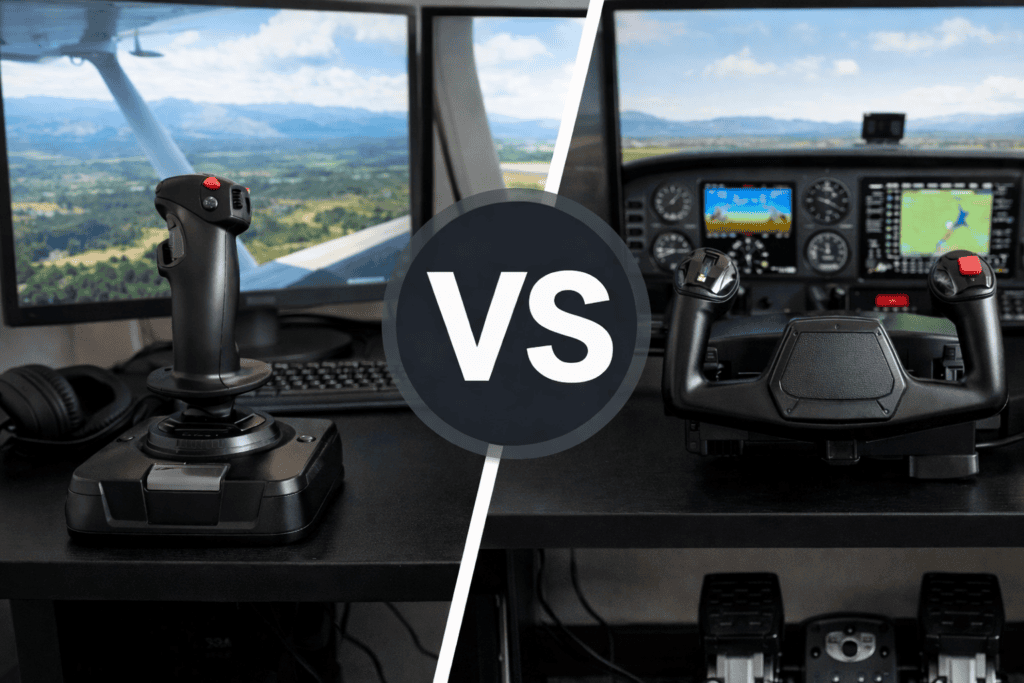
Comparing joystick and yoke controls.
Some flight simulator enthusiasts prefer using a yoke instead of a joystick, particularly when flying aircraft such as the Cessna 172 or larger commercial airliners.
However, joysticks remain extremely popular because they are versatile and work well with many different aircraft types. Fighter jets, bush planes, and aerobatic aircraft often use joystick-style controls in real life, making them a natural fit in the simulator.
For many pilots, a joystick provides the best balance of affordability, simplicity, and immersion.
Are Joysticks Good for Beginners?
Yes. In fact, a joystick is often the best starting point for new flight simulator pilots.
A basic joystick setup allows you to learn the fundamentals of aircraft control without needing a large amount of hardware. Once you become more experienced, you can gradually expand your setup with additional equipment such as rudder pedals or throttle quadrants.
This gradual approach allows you to build your simulator environment over time.
Expanding Your Flight Simulator Hardware Setup
As your interest in flight simulation grows, you may wish to add additional hardware to complement your joystick.
Common upgrades include:
rudder pedals for more precise ground steering
throttle quadrants for multi-engine aircraft
Head tracking devices for improved cockpit visibility
These additions can significantly enhance the realism of your simulator setup, but many pilots continue to enjoy Microsoft Flight Simulator using only a joystick.
SUMMARY
A joystick remains one of the most accessible and versatile pieces of hardware for Microsoft Flight Simulator. It provides precise aircraft control, simple setup, and an affordable entry point into the world of flight simulation.
Regardless of whether you are flying small general aviation aircraft, exploring scenic routes, or practicing approaches into challenging airports, a well-configured joystick can greatly improve the realism and enjoyment of the simulator.
For many flight simulator pilots, it is the first step toward building a more complete and immersive home cockpit environment.
So, which Joystick?
The best joystick for you depends on the features you want and the budget you have available. I always recommend taking some time to compare a few different options before making a purchase. Amazon has a huge range of flight simulation hardware, making it easy to compare products, prices, and customer reviews all in one place.
Personally, I’ve bought many items from Amazon over the years and have always had good experiences. I’ve only needed to return a couple of products, and in both cases the process was simple and hassle-free. That’s one of the reasons I continue to use them.
Best yoke for flight simulator.Flight simulator yokes are one of the most popular pieces of hardware used by enthusiasts who want a more realistic flying experience in Microsoft Flight Simulator. While joysticks are often the starting point for many pilots, a yoke can provide a control style that closely resembles the controls found in many real-world aircraft.
Aircraft such as the Cessna 172, Beechcraft Bonanza and many commercial airliners use a yoke instead of a joystick. Because of this, many flight simulation pilots choose a yoke to better replicate the handling and control feel of these aircraft.
In this guide, we explore how yokes work in flight simulation, what advantages they offer, and how they can improve realism and immersion when flying in Microsoft Flight Simulator.
What Is a Flight Simulator Yoke?
A flight simulator yoke is a control device that replicates the control wheel used in many real aircraft. Instead of moving a joystick, the pilot controls the aircraft by pushing, pulling, and turning the yoke.
Pulling the yoke back raises the aircraft’s nose and initiates a climb, while pushing the yoke forward lowers the nose and begins a descent. Turning the yoke left or right controls the aircraft’s roll, allowing the pilot to bank the aircraft during turns.
This style of control feels very natural when flying aircraft designed around a yoke-based control system.
Why Many Pilots Prefer Yokes
Comparing joystick and yoke controls
For aircraft that use yokes in real life, this control method can feel much more authentic than a joystick. Many flight simulator enthusiasts enjoy the sensation of flying with controls that closely match the layout of a real cockpit.
A yoke also allows for more gradual control inputs, which can be especially useful during approach and landing. Small adjustments are often easier to manage with a yoke, making it easier to maintain smooth and stable flight.
For pilots who primarily fly general aviation aircraft or airliners, a yoke can add a strong sense of realism to the simulator experience.
Features to Consider in a Flight Simulator Yoke
Not all yokes are identical, and several features can affect the quality of the flying experience.
Smooth Control Movement
A good yoke should move smoothly and provide consistent resistance when pushed or pulled. Smooth movement allows the pilot to make small adjustments without sudden jumps in control input.
Build Quality
Flight simulator yokes are often mounted to desks or cockpit frames, so a sturdy design is important. A well-built yoke will remain stable during flight and provide consistent control feedback.
Programmable Buttons and Switches
Many yokes include programmable switches, buttons, and hat controls. These can be assigned to functions such as trim, flaps, landing gear and camera controls.
Having these functions directly on the yoke reduces the need to use the keyboard during flight.
Yokes and Different Types of Aircraft
While yokes are ideal for many aircraft, they are not the only control style used in aviation.
Aircraft such as fighter jets and some modern airliners use sidesticks or control sticks instead. However, many popular aircraft in Microsoft Flight Simulator — especially general aviation aircraft — are designed around yoke controls.
For pilots who enjoy flying these aircraft, a yoke provides a very authentic control experience.
Together, these components create a more immersive simulator environment that closely resembles a real aircraft cockpit.
SUMMARY
Flight simulator yokes provide an excellent way to enhance realism in Microsoft Flight Simulator. By replicating the control wheel used in many real aircraft, they allow pilots to experience a control style that closely matches real-world aviation.
For enthusiasts who enjoy flying general aviation aircraft or airliners, a yoke can greatly improve immersion and provide a more authentic flying experience.
The best yoke for you depends on the type of aircraft you enjoy flying and the level of realism you’re looking for. Whether you’re flying a Cessna, an airliner, or a general aviation aircraft, it’s worth comparing several options before making a decision. Amazon makes it easy to compare features, pricing, and customer reviews in one convenient place.
Personally, I’ve bought many items from Amazon over the years and have always had good experiences. I’ve only needed to return a couple of products, and in both cases the process was simple and hassle-free. That’s one of the reasons I continue to use them.
Rudder pedals are an important component of many flight simulator setups. It is possible to fly Microsoft Flight Simulator without dedicated rudder controls. Adding rudder pedals introduces a new level of realism and precision, greatly enhancing the flying experience.
In real aircraft, rudder pedals are used to control yaw — the left and right movement of the aircraft’s nose. They are also used to steer the aircraft during taxi and takeoff, and to assist with coordinated turns while airborne.
This guide explains how rudder pedals work in Microsoft Flight Simulator and why they are useful. We talk about how they can improve both control and immersion in your simulator setup.
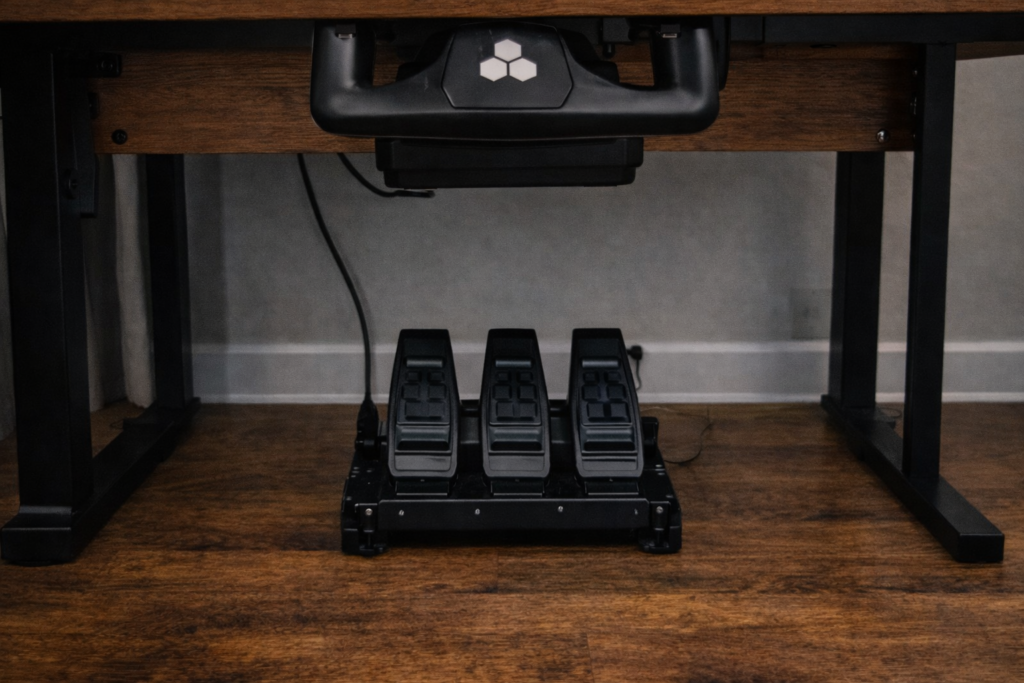
Flight simulator setup with rudder pedals
What Rudder Pedals Control
Rudder pedals allow the pilot to control the yaw axis of the aircraft. This is the sideways movement that helps coordinate turns and maintain stable flight.
When flying an aircraft, rudder input is often used alongside ailerons to create smooth and coordinated turns. Without rudder input, turns can feel less balanced, and the aircraft may slip or skid.
Rudder pedals are also essential for steering the aircraft on the ground.
Taxiing and Ground Control
One of the most noticeable improvements when using rudder pedals occurs during taxi operations.
In real aircraft, pilots steer the aircraft on the ground using rudder pedals or nose wheel steering linked to the pedals. Using dedicated pedals in the simulator makes taxiing feel much more natural and precise.
This is especially useful at busy airports where careful ground manoeuvring is required.
Crosswind Landings
Rudder pedals are particularly valuable in crosswind conditions.
When strong winds blow across the runway, pilots must use rudder input to keep the aircraft aligned with the runway during landing. Practicing these techniques in Microsoft Flight Simulator becomes far more realistic when using proper rudder pedals.
Together, these devices allow the pilot to manage pitch, roll, and yaw simultaneously. Thus creating a control experience that closely resembles real-world flight.
For many simulator pilots, adding rudder pedals is one of the most noticeable upgrades. Furthermore, they make purchases after purchasing a joystick or yoke.
SUMMARY
Rudder pedals add an important layer of realism to Microsoft Flight Simulator by allowing pilots to control yaw and steer the aircraft on the ground.
They make taxiing more natural, improve coordinated turns, and allow pilots to practice advanced flying techniques such as crosswind landings. For many flight simulation enthusiasts, rudder pedals are an essential step toward building a more complete and immersive simulator setup.
The best rudder pedals for you will depend on your budget, available space, and the level of realism you’re aiming for. Good rudder pedals can greatly improve your flying experience, particularly during takeoffs, landings, and crosswind operations. Amazon offers a wide selection, making it easy to compare different models and read user feedback before buying.
Personally, I’ve bought many items from Amazon over the years and have always had good experiences. I’ve only needed to return a couple of products, and in both cases, the process was simple and hassle-free. That’s one of the reasons I continue to use them.
One of the most exciting aspects of flight simulation is building your own home cockpit environment. Above all, whether you are a beginner just starting with Microsoft Flight Simulator or an experienced enthusiast looking to expand your setup. The right hardware can greatly enhance realism and immersion.
Flight simulator setups do not need to be complicated or expensive. Many pilots begin with a simple desk-based setup and gradually add additional equipment over time.
Many flight simulation enthusiasts operate their setups directly from a computer desk. (image at the top)
Also, modern flight simulator hardware is designed to clamp easily to desks, making it simple to assemble a capable simulator environment without requiring a dedicated room.
However, this flexibility allows pilots to enjoy the simulator while maintaining a practical home workspace.
By choosing the right hardware and arranging it in a comfortable workspace, it is possible to create a highly immersive and enjoyable flight simulation experience right at home.
Microsoft Flight Simulator already offers one of the most realistic flying environments ever created on a home computer. The aircraft behaves convincingly, the world is rendered in remarkable detail, and the simulator allows pilots to experience aviation in ways that were once impossible outside a real cockpit.
However, the level of immersion can increase dramatically when dedicated flight simulator hardware is added to the setup. While it is possible to fly using a keyboard or a simple game controller, specialised controls such as joysticks, yokes, throttle quadrants, and rudder pedals allow the pilot to interact with the aircraft in a much more natural and realistic way.
For many sim pilots, hardware upgrades represent the moment when the simulator begins to feel less like a game and more like a genuine flying experience. This guide explains how flight simulator hardware improves immersion, what types of equipment are available, and why many enthusiasts gradually expand their setups over time.
Why Hardware Matters in Flight Simulation
One of the defining characteristics of aviation is the way a pilot interacts with the aircraft through physical controls. In a real cockpit, pilots use control columns or yokes, throttle levers, rudder pedals, switches, and instrument panels to fly the aircraft.
When using only a keyboard or controller, these interactions become indirect. Pressing keys or moving a thumbstick can control the aircraft, but it does not replicate the feel or precision of real flight controls.
Dedicated flight simulator hardware changes this by allowing the pilot to manipulate the aircraft using devices designed to mimic real cockpit controls. Movements become smoother, inputs become more precise, and the act of flying becomes far more intuitive.
Many sim pilots report that once they begin using dedicated flight controls, it becomes difficult to return to basic input devices.
Most flight sticks also include additional buttons that can be assigned to important functions such as trimming the aircraft, controlling the view, or operating the landing gear.
Joysticks are particularly popular for:
beginners entering the hobby
military aircraft
helicopters
smaller desktop setups
A good joystick alone can make the simulator feel far more engaging and responsive.
Yokes and Control Columns
High-quality flight simulation hardware setup with yoke, throttle, and multiple screens for realistic flight training.
Many civilian aircraft use a yoke rather than a joystick. A yoke resembles a small steering wheel and is pushed, pulled, and rotated to control the aircraft.
Yokes are popular with sim pilots who enjoy flying:
Showcasing essential hardware, including a throttle quadrant for flight simulation.
Throttle controls manage the power produced by the aircraft’s engines. While power can be adjusted using keyboard commands or sliders, a dedicated throttle quadrant allows the pilot to move physical levers just as they would in a real cockpit.
Throttle quadrants often include:
throttle levers
propeller controls
mixture controls
engine switches
For multi-engine aircraft and airliners, throttle quadrants add a significant layer of realism and control.
Without rudder pedals, yaw control is usually mapped to keyboard inputs or joystick twists, which can feel less natural.
Adding rudder pedals often makes taxiing and landing much smoother and more realistic.
Head Tracking and Situational Awareness
Another type of hardware that dramatically improves immersion is head tracking. These systems track the movement of the pilot’s head and translate it into camera movement inside the simulator.
This allows pilots to naturally look around the cockpit, check instruments, and scan for traffic simply by moving their head.
Head tracking can greatly improve situational awareness and make the virtual cockpit feel much more three-dimensional.
Building a Complete Flight Simulator Setup
Many flight simulator enthusiasts gradually expand their hardware over time. A typical progression might look something like this:
joystick or yoke
throttle quadrant
rudder pedals
head tracking system
multiple monitors or VR
Each addition increases the realism of the simulator and helps replicate the experience of sitting in a real cockpit.
Some dedicated sim pilots eventually build full home cockpit setups with multiple screens, instrument panels, and specialised hardware.
Choosing the Right Hardware
There is no single perfect setup for every sim pilot. The best hardware depends on several factors, including:
Many beginners start with a simple joystick and later upgrade their equipment as their interest in the simulator grows.
Summary
Microsoft Flight Simulator is already an impressive simulation platform, but dedicated hardware can dramatically enhance the experience. By replacing keyboard inputs with physical controls such as joysticks, yokes, throttle quadrants, and rudder pedals, the simulator begins to feel far more natural and immersive.
For many enthusiasts, flight simulator hardware serves as the bridge between casual flying and a deeper appreciation of aviation. Whether starting with a simple joystick or gradually building a complete home cockpit, hardware lets pilots interact with the simulator in ways that closely resemble real flight.
As the hobby continues to grow, hardware remains one of the most effective ways to transform Microsoft Flight Simulator from a game into a truly immersive aviation experience.