
Microsoft Flight Simulator 2024 is an incredible step forward in realism, immersion, and sheer scale—but it can also feel overwhelming at times. Whether you’re just starting out or already flying regularly, a few smart tips can dramatically improve your experience, performance, and overall enjoyment.
In this guide, we’ll walk through practical, real-world tips that make a genuine difference—no fluff, just things that actually help when you’re sitting in the cockpit.
Getting Started the Right Way
Before diving into advanced flying techniques, it’s worth setting up your sim properly.
Adjust Your Assistance Settings
MSFS 2024 includes a wide range of assistance options, and getting these right is key.
- Start with Medium assistance if you’re unsure
- Gradually reduce assists as you improve
- Turn off the auto-rudder early if you want better control
- Disable AI piloting features to build real skills
The goal is to strike a balance between realism and enjoyment.
Improve Performance and Reduce Stutters
Even on a good system, MSFS 2024 can struggle if not configured properly.
Optimize Graphics Settings
- Set Terrain Level of Detail (LOD) between 100 and 150
- Reduce Cloud Quality if you notice stuttering
- Turn down Glass Cockpit Refresh Rate (big performance gain)
- Use DLSS or FSR if available
Internet Connection Matters More Than You Think
MSFS streams huge amounts of data in real time.
- Use a wired Ethernet connection if possible
- Enable Rolling Cache in settings
- Increase cache size to at least 20–50 GB
If you ever see buildings “morphing” or loading late, it’s usually streaming—not your PC.
Master the Cockpit Faster
Learning aircraft systems can feel overwhelming, especially with complex airliners.
Start Simple
- Begin with a smaller aircraft, like a Cessna 172
- Learn basic controls before jumping into airliners
- Focus on one aircraft at a time
Learn the Key Instruments
Don’t try to learn everything at once. Focus on:
- Airspeed indicator
- Altimeter
- Heading indicator
- Vertical speed
Once these make sense, everything else becomes easier.
Use Flight Planning Tools Properly
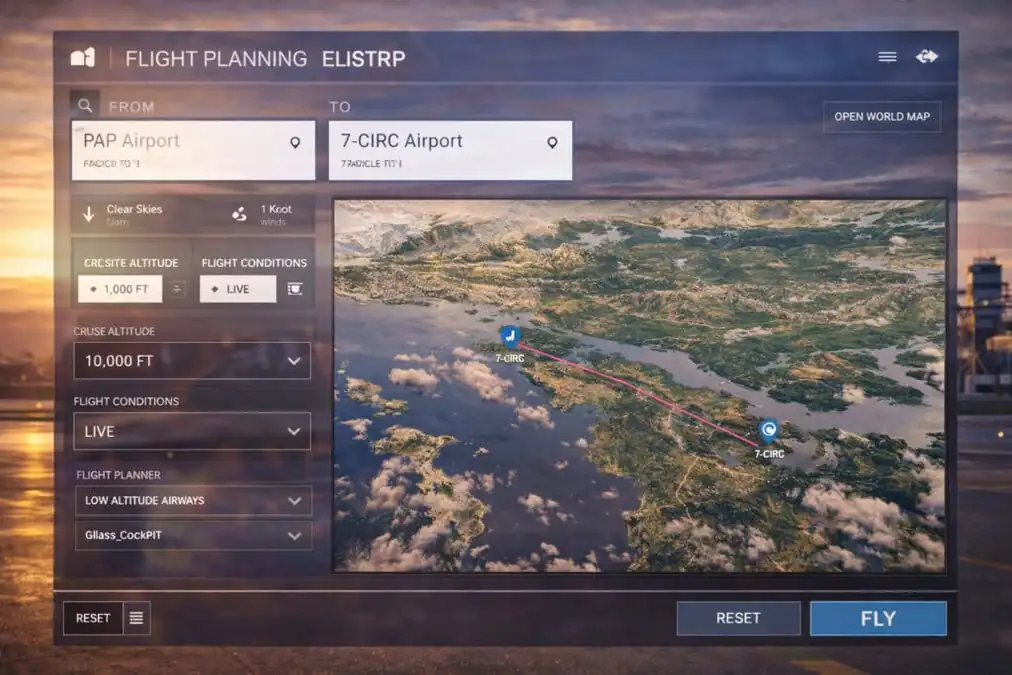
A good flight starts before you even leave the ground.
Plan with SimBrief
SimBrief is essential for realistic flight planning.
- Generates routes, fuel, and weights
- Works with most modern aircraft
- Ensures consistency between the sim and FMC
Match Your Navigation Data
Make sure your sim and aircraft use the same nav data.
- Keep everything updated (Navigraph helps)
- Prevents route mismatches and missing waypoints
Improve Your Landings
Landing is where everything comes together—and where most frustration happens.
Stabilized Approach is Everything
- Be on speed, on altitude, and aligned early
- Avoid last-second corrections
- Use small, smooth inputs
Watch Your Descent Rate
- Aim for around 500–700 ft/min on final
- Too fast = hard landing
- Too slow = float and overshoot
Practice Short Flights
The fastest way to improve landings:
- Do repeated circuits at the same airport
- Focus only on the approach and touchdown
- Ignore everything else
Use the Right Camera Views
Camera control is often overlooked but makes a big difference.
Set Custom Cockpit Views
- Save your preferred pilot position
- Adjust zoom for realism
- Keep instruments clearly visible
Use External Views Sparingly
They’re great for:
- Checking your aircraft position
- Enjoying scenery
But staying in the cockpit builds better flying habits.
Make Weather Work for You
The weather can completely change your experience.
Start with Clear Conditions
- Learn in calm weather first
- Build confidence before adding complexity
Gradually Add Realism
- Try live weather once comfortable
- Practice crosswind landings
- Learn how wind affects the approach
Build a Simple Workflow
Consistency makes everything easier.
Before Every Flight
- Load flight plan
- Check fuel and weight
- Set weather
- Review the departure runway
During Flight
- Monitor speed and altitude
- Stay ahead of the aircraft
- Make small adjustments early
Before Landing
- Slow down gradually
- Configure flaps and gear early
- Stabilize your approach
This routine quickly becomes second nature.
Avoid Common Mistakes
These are things almost every simmer runs into at some point:
- Trying to learn everything at once
- Jumping between too many aircraft
- Ignoring flight planning
- Overcorrecting controls
- Expecting perfect landings immediately
Progress comes from repetition, not perfection.
Take Advantage of Add-ons (When Ready)
Once you’re comfortable, add-ons can enhance your experience.
- Better aircraft for realism
- High-quality airports
- Weather and traffic enhancements
But don’t rush into this—master the basics first.
Final Thoughts
Microsoft Flight Simulator 2024 is one of the most rewarding simulation experiences available today, but it really shines when you take the time to learn it properly.
Start simple, stay consistent, and focus on small improvements each time you fly. Before long, everything—from navigation to landings—will feel natural.
And most importantly, enjoy the journey. That’s what it’s all about.