
Microsoft Flight Simulator 2024 Add-ons Guide. One of the biggest reasons Microsoft Flight Simulator has remained popular for decades is the extraordinary ecosystem of add-ons built around it. The simulator already provides a highly detailed digital world, but the real strength of the platform comes from the ability to expand it with third-party content. That flexibility is what turns Microsoft Flight Simulator from a beautiful base simulator into a deeply personal aviation hobby.
About addons
Add-ons allow pilots to shape the simulator around the kind of flying they actually enjoy. Some simmers focus on airline operations with study-level aircraft, realistic procedures, and detailed international hubs. Others prefer low-and-slow scenic flying with general aviation aircraft, smaller regional airports, and custom scenery in mountain regions, coastlines, or remote bush strips. Many pilots end up building a balanced library that supports several different styles of flying, depending on mood and interest.
This freedom has helped create one of the most active communities in simulation software. Independent developers, professional studios, freeware hobbyists, and specialist tool makers all contribute new aircraft, airports, scenery packages, utilities, liveries, and workflow improvements. The result is a living ecosystem that keeps evolving long after the simulator itself is released.
For many flight sim enthusiasts, add-ons are not a small extra. They are the heart of the experience. A single high-quality aircraft can provide hundreds of hours of learning and enjoyment. A favourite airport can make every arrival feel more authentic. A carefully chosen scenery pack can transform an entire region into a place you want to keep exploring again and again.
In this guide, we will take a detailed look at the Microsoft Flight Simulator add-on ecosystem. We will cover the major categories of add-ons, explain how each type improves the simulator, look at freeware versus payware, discuss safe download sources, explain installation and management, and finish with practical advice for building a smart add-on library without creating unnecessary clutter or performance problems.
What Are Microsoft Flight Simulator Add-ons?
At its simplest, an add-on is extra content that enhances the simulator beyond its default installation. That content might be a new aircraft, a detailed airport, a city enhancement, a utility program, a livery pack, a weather tool, or a navigation aid. Some add-ons improve realism. Others improve convenience. Some are purely visual. Others change how you interact with the simulator every time you fly.
Microsoft Flight Simulator was designed to support third-party development. The simulator includes a software development kit that allows creators to build content using the same broad platform framework that supports the simulator itself. That open model has encouraged a huge number of developers to contribute to the ecosystem, and it is one of the reasons the platform continues to grow so quickly.
The quality and scale of add-ons vary widely. At one end of the spectrum, you might download a small freeware livery or a local landmark pack for a region you enjoy flying over. At the other end, you might purchase a study-level airliner with deeply simulated systems, custom avionics, realistic failures, and detailed operating procedures that take weeks or months to learn properly.
Because of this variety, the word add-on really covers a broad world of content. It is not just about buying more things for the simulator. It is about shaping the simulator into an environment that supports your interests. In that sense, add-ons are part of what makes Microsoft Flight Simulator feel less like a single product and more like a platform that keeps expanding over time.
The Major Categories of Add-ons
Most Microsoft Flight Simulator add-ons fall into a handful of major categories. Understanding these categories makes it much easier to decide what is worth downloading and what is not, especially when you are just getting started.
- Aircraft
- Airports
- Scenery and environment enhancements
- Utility tools
- Liveries and visual modifications
Each category improves a different part of the simulator. Aircraft define the way you fly. Airports shape the places where flights begin and end. Scenery enhances the world around you. Utilities improve the workflow, planning, and usability of the simulator. Liveries and visual packs personalise the experience further.
Not every pilot needs large amounts of content in every category. A simmer who mostly flies airliners may care deeply about detailed hubs and realistic aircraft systems. A VFR pilot may get more value from regional scenery, light aircraft, and small airport packs. The most useful add-ons are the ones that match the way you actually use the simulator.
The Most Popular Add-ons in Flight Simulation
Aircraft are by far the most popular type of Microsoft Flight Simulator add-on. That is not surprising. The aircraft you fly shapes almost every aspect of the experience, from how much preparation is required before departure to how fast you travel, how high you cruise, and what kinds of airports and routes become interesting.
Aircraft developers often spend years creating a single model. They study cockpit references, operating manuals, real-world procedures, sound recordings, performance data, and flight characteristics. The best aircraft add-ons are not just prettier versions of the default fleet. They often represent a completely different level of fidelity, depth, and immersion.
A good aircraft add-on can change how you think about the simulator. It can encourage more realistic planning, more disciplined procedures, and more meaningful engagement with the aircraft itself. Instead of simply loading on the runway and flying, you begin to interact with systems, checklists, navigation, startup logic, and performance management in a far more deliberate way.

Study-Level Aircraft
One of the terms you will hear frequently in the flight simulation community is study-level aircraft. This refers to aircraft that simulate real-world systems in considerable detail. While the term is not perfectly precise, it usually implies that the aircraft goes far beyond simple switch animation or basic autopilot function.
Study-level aircraft often include highly detailed implementations of systems such as:
- Flight management systems and route programming
- Autopilot modes and realistic behaviour
- Electrical systems and power logic
- Hydraulic and pneumatic systems
- Engine modelling and startup procedures
- Pressurisation, fuel, and warning systems
These aircraft are designed for pilots who enjoy learning how real aircraft operate. They reward patience, curiosity, and repeated use. Many simmers find that a single excellent aircraft can provide more value than dozens of shallow add-ons because it gives them something meaningful to keep learning over time.
The downside is that study-level aircraft can be demanding. There is often a steeper learning curve, and some new simmers may initially feel overwhelmed. That is perfectly normal. The best way to approach these aircraft is gradually. Learn the basics, follow the manual, and allow the aircraft to become more familiar over a series of flights rather than trying to master everything in a single session.
General Aviation Aircraft
General aviation aircraft are another major category of add-ons and are especially popular with pilots who enjoy scenic flying, shorter routes, and a more relaxed pace. These aircraft can include piston singles, piston twins, touring aircraft, turboprops, floatplanes, and bush aircraft.
One of the reasons GA aircraft are so enjoyable is that they let you interact more closely with the world below. You are often flying lower and slower than in an airliner, which means scenery matters more, landmarks are easier to appreciate, and the overall flight can feel more personal and exploratory.
General aviation add-ons are also often more approachable for simmers who do not want to dive deeply into airline procedures. They still benefit from realism and good system modelling, but the flights tend to feel more direct and flexible. A short hop between regional airports, a coastal VFR flight, or a mountain crossing in a light aircraft can be just as rewarding as a carefully programmed IFR route in a jet.
Specialised Aircraft
Beyond airliners and standard GA aircraft, the simulator ecosystem includes a wide range of specialised aircraft types. These often appeal to pilots looking for something different from conventional route flying.
- Helicopters for low-level exploration and vertical flight
- Vintage warbirds for historic aviation experiences
- Bush aircraft for rough fields and remote strips
- Amphibious aircraft for water operations
- Military jets for high-performance flying
These aircraft can open up completely new parts of the simulator. A helicopter turns cities and coastlines into low-level exploration environments. A bush plane makes short gravel strips and wilderness routes feel exciting. A warbird brings a very different sense of energy and aircraft handling. If you ever feel your flying has become too routine, a specialised aircraft can refresh the simulator dramatically.
Choosing the Right Aircraft Add-ons
The best aircraft add-on is not simply the most complex or the most expensive. It is the one that matches the type of flying you actually enjoy. A detailed airliner may be incredible, but if you mostly fly scenic short routes in daylight, you may get more value from a well-made GA aircraft. Likewise, if you love airline procedures, a simple sightseeing aircraft may not hold your attention for long.
A good strategy is to build slowly. Choose one or two excellent aircraft that genuinely suit your interests. Learn them well. Use them often. Over time, you will develop a much clearer understanding of what kinds of aircraft deserve a place in your simulator library.
Why Airports Matter in Microsoft Flight Simulator
Every flight begins and ends at an airport, so airports have a major impact on the quality of the overall experience. Microsoft Flight Simulator includes a vast number of airports, but the level of detail is uneven. Some airports look good out of the box. Others use generic terminals, inaccurate layouts, or simplified environments that break immersion, especially if you know the real location well.
Airport add-ons improve these locations by recreating them with far greater accuracy and character. Developers often model terminal buildings, taxiways, hangars, jetways, runway markings, signage, lighting systems, service roads, cargo areas, and surrounding infrastructure. The difference can be dramatic, especially at airports you use regularly.

International Hub Airports
Large international airports are among the most popular scenery add-ons in the ecosystem. These airports serve as the centrepiece for airline operations and often define the visual impact of a departure or arrival. A detailed hub airport can make an airliner flight feel far more authentic from gate to gate.
High-quality international airports often include:
- Accurate terminal architecture
- Detailed jetways and gate areas
- Correct runway and taxiway layouts
- Realistic taxiway signage
- Advanced lighting for night operations
- Custom ground textures and markings
For pilots who enjoy repeating favourite airline routes, these airports add huge value because they are used so often. If you regularly fly into a particular city or along a specific network of routes, upgrading those key airports usually makes far more sense than buying random scenery you rarely visit.
Regional and Smaller Airport Add-ons
While international hubs get a lot of attention, smaller airports can be just as valuable. For general aviation pilots, smaller airports are often far more important because they define the destinations of everyday flying.
Regional airports are especially useful for:
- General aviation flights
- Business jet operations
- Short VFR hops
- Scenic regional exploration
Detailed small airports often have a sense of place that generic defaults cannot match. Local hangars, terrain shaping, custom buildings, apron detail, and nearby landmarks can make these airports feel much more alive. They also tend to be lighter on performance than major hubs, which makes them attractive on mid-range hardware.
What Makes a Good Airport Add-on
Not every airport add-on is equally good. Some look impressive in screenshots but perform poorly in use. Others may be visually simpler but much better optimised and more enjoyable to fly in and out of regularly.
The best airport add-ons usually balance several things well:
- Accurate layout and markings
- Strong visual quality
- Good lighting
- Smooth performance
- Careful optimisation
- Attention to surrounding detail
For practical flying, layout accuracy and performance often matter more than raw visual density. An airport that taxis correctly, feels believable, and performs smoothly is usually more satisfying over time than one that looks spectacular but causes stutters, slowdowns, or immersion-breaking layout problems.
Enhancing the World Outside the Cockpit
Scenery add-ons improve the landscapes, landmarks, cities, and environments you see while flying. Even though Microsoft Flight Simulator already offers impressive global scenery, third-party developers frequently enhance specific places with much better regional detail and local character.
These enhancements may include:
- Improved terrain textures
- Detailed city skylines
- Custom landmarks
- Better vegetation and tree placement
- Improved coastlines and terrain shaping
Scenery add-ons are especially valuable for VFR pilots because visual navigation depends on the world looking recognisable from the air. When landmarks, coastlines, ridges, bridges, and city shapes match reality more closely, the simulator becomes much more convincing as a place to explore rather than just a backdrop beneath the aircraft.

City Enhancement Packages
City packs focus on improving major metropolitan areas. These add-ons often recreate skylines with custom buildings and carefully modelled landmarks. Famous bridges, stadiums, towers, historic buildings, and waterfront structures may all be recreated so they are recognisable when flying overhead.
These packs are especially popular with:
- Helicopter pilots
- Sightseeing flights
- Low-level VFR routes
- Content creators taking screenshots or videos
A good city enhancement can completely transform a location. Flying at sunrise or sunset over a recognisable skyline with custom landmarks often produces some of the most memorable moments in the simulator.
Regional Scenery Packs
Regional scenery packs improve an entire area rather than a single city. These can provide excellent value because every flight in that area benefits from the upgrade. For example, if you regularly fly in one mountain region, one coastline, or one country, a regional scenery pack may improve every route you take there.
Regional packs may include:
- Enhanced terrain colouring
- Refined mountain and ridge detail
- Improved coastlines and shoreline transitions
- Custom towns, villages, and structures
- Better vegetation placement
For many simmers, regional packs offer better long-term value than random single-location purchases because they improve an entire flying environment rather than one destination.
Landmark Packs
Landmark packs focus on recreating famous structures or points of interest that are easily recognisable from the air. These are often extremely useful for VFR flying because landmarks provide important visual cues during navigation.
Examples can include:
- Observation towers
- Major bridges
- Historic city buildings
- Stadiums and arenas
- Natural landmarks
Even a relatively small landmark pack can make a region feel much more believable, especially if the default simulator leaves those structures generic or inaccurate.
Tools That Improve the Simulator Workflow
Utility add-ons are different from aircraft and scenery because they improve how the simulator works rather than simply what it looks like. These tools often make planning, navigation, camera control, and overall usability more efficient.
While they may not be as visually dramatic as a new airport or aircraft, utilities can have a major impact on the everyday flight simulation experience. In some cases, a good utility becomes part of every single flight.
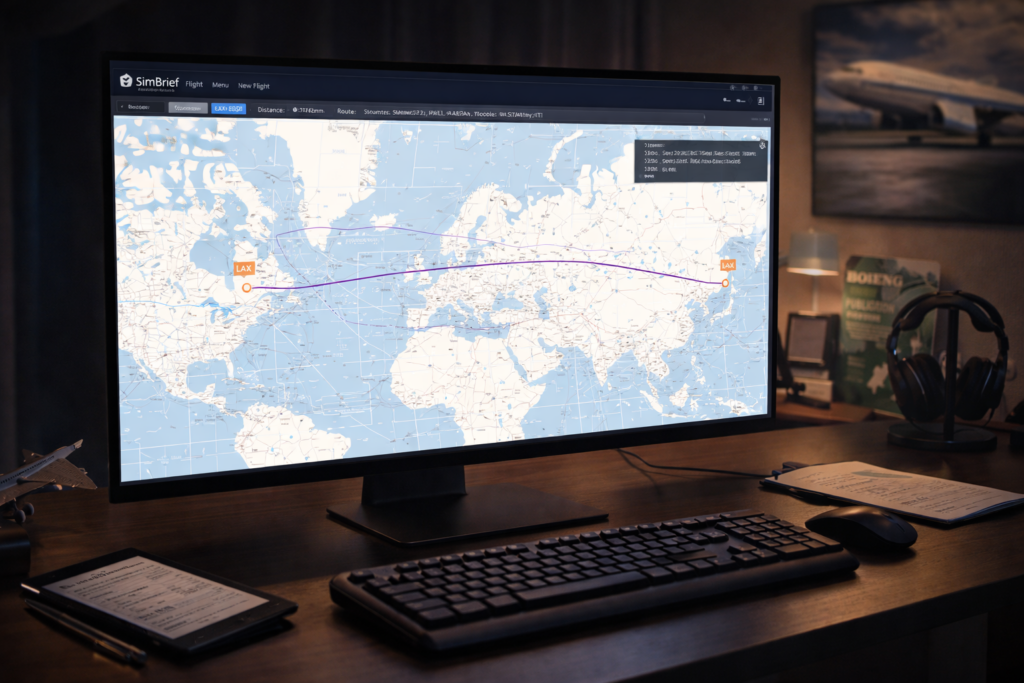
Flight Planning Tools
Flight planning tools help pilots prepare routes using more realistic procedures. Instead of simply selecting a departure and destination, these tools often allow route building with real-world airways, fuel estimates, weather review, and procedure planning.
Typical features may include:
- Route planning using real navigation data
- Fuel calculations
- Weather briefings
- Airport information
- Chart integration
For pilots who enjoy airline-style operations or IFR flying, these tools can make the whole experience feel more structured and realistic.
Navigation and Chart Tools
Navigation utilities often provide moving maps, procedure charts, airport diagrams, and real-time route awareness. These are especially useful for instrument flying, where understanding airways, fixes, approaches, and airport ground layouts matters much more.
Even for more casual simmers, a good navigation utility can reduce confusion and make complex flights feel more manageable.
Camera and Visual Tools
Camera utilities are extremely popular with content creators and screenshot enthusiasts. They allow pilots to set up smoother external views, cinematic fly-bys, custom cockpit angles, and dynamic framing that goes far beyond the default experience.
These tools are useful for:
- Video creation
- Screenshot capture
- External showcase flights
- Custom cockpit perspectives
For a website like yours, tools that help with screenshots and presentations can be especially valuable because they improve the quality of the article and homepage imagery as well as the flying experience itself.
Traffic, Environment, and Workflow Utilities
Some utilities improve the atmosphere of the simulator rather than the route planning side. These can include traffic tools, environmental enhancements, sound packs, or utilities that streamline simulator setup and session management. They may seem subtle at first, but together they can make the simulator feel much more alive and polished.
Freeware vs Payware Add-ons
When exploring Microsoft Flight Simulator add-ons, you will quickly notice that most content falls into two broad groups: freeware and payware. Both are important, and both can be excellent. The key is understanding what each tends to offer.
Freeware add-ons are distributed at no cost and are usually created by community members, enthusiasts, or hobbyist developers. They can include liveries, small regional airports, landmarks, scenery improvements, and even aircraft projects.
Payware add-ons are commercial products created by professional studios or dedicated independent developers. These usually involve more time, resources, testing, support, and long-term development.
The Strengths of Freeware
Freeware is one of the best parts of flight simulation. It adds huge variety, especially in areas that may never receive commercial attention. Small local airports, regional scenery, local landmarks, repaint packages, and community fixes can all add a lot to the simulator.
Freeware is particularly useful when:
- You want to improve a local area
- You need liveries or small enhancements
- You want to experiment without spending money
- You are building a broader scenery base gradually
That said, freeware quality varies. Some projects are excellent. Others are more basic, older, or less polished. It is always worth checking comments, screenshots, and recent updates before installing large community packages.
The Strengths of Payware
Payware typically offers higher development depth, especially for complex aircraft and premium airport scenery. Developers can spend much longer refining systems, textures, sound, modelling, and compatibility when the project is commercially funded.
Payware often makes the most sense for:
- High-fidelity aircraft
- Detailed international hubs
- Specialised workflow tools
- Content you know you will use repeatedly
The best approach for most simmers is not freeware or payware. It is a balanced mix of both. Use freeware for variety and local improvements. Use payware for the centrepieces of your simulator library.
Where to Download Add-ons Safely
Because the add-on ecosystem is so large, it is important to download content from reliable sources. This helps reduce the risk of outdated files, broken packages, and poor installation practices.
The In-Simulator Marketplace
The built-in marketplace is often the simplest place for beginners to start. It offers secure purchasing, integrated browsing, and straightforward installation. Content purchased there is managed directly through the simulator environment, which makes it convenient.
The marketplace is useful because it offers:
- Simple installation
- Secure payment handling
- Integrated browsing
- Centralised ownership
The main downside is that updates can sometimes appear later there than through direct external stores.
Developer Websites and Stores
Many serious simmers also buy directly from developers or specialist simulation stores. This can offer faster update access, direct support, and sometimes more detailed product information. If you know and trust a developer, buying directly can be an excellent option.
Community Libraries
Community libraries are the main home for freeware. These are excellent for scenery enhancements, liveries, local airports, and regional improvements. They are especially useful when you want to improve a specific area without spending heavily.
Safe downloading comes down to using known sources, reading user feedback, and checking that the file is reasonably current and actively maintained.
Understanding the Community Folder
Most manually installed Microsoft Flight Simulator add-ons are placed in the Community Folder. This is the directory the simulator checks for additional content when it launches. Once the simulator starts, the compatible packages stored there are loaded automatically.
A basic manual installation usually follows these steps:
- Download the add-on package
- Extract the files if needed
- Locate the Community Folder
- Place the correct folder inside it
- Restart the simulator
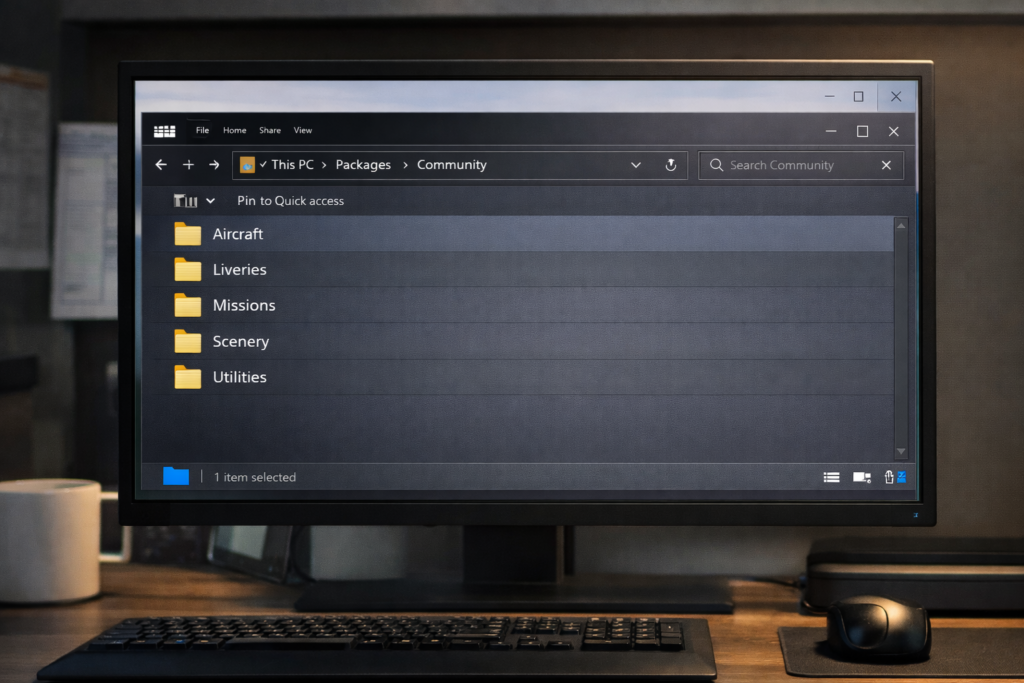
It sounds simple, and usually it is, but the most common mistakes involve placing the wrong folder layer into the Community Folder or leaving the package compressed. Taking a moment to inspect the folder structure usually avoids these problems.
Add-on Managers
As your library grows, manual folder management can become messy. Add-on managers solve this by letting you enable or disable packages quickly without constantly moving files around yourself.
These tools are especially useful if you:
- Own a large scenery library
- Use different aircraft and region combinations
- Want faster troubleshooting
- Need to reduce loading clutter
For example, you might keep only European scenery active during a European session, or enable just your favourite airline route airports when flying a particular aircraft.
How Add-ons Affect Performance
Add-ons can greatly improve realism, but they can also affect system performance. Detailed aircraft increases system workload through advanced systems simulation. Large airports add dense modelling, lighting, and texture load. Scenery packs can add thousands of objects or high-resolution terrain data.
The heaviest performance hits often come from:
- Complex aircraft systems
- Large international hub airports
- Dense city scenery
- Very high-resolution environmental packs
This does not mean you should avoid good add-ons. It simply means you should be selective. A carefully chosen library almost always performs better and feels more coherent than a huge pile of content installed just because it was available.
When Something Stops Working
Occasionally, an add-on causes a problem. You might see missing airport objects, broken terrain, duplicate buildings, poor loading behaviour, or a conflict after a simulator update. In many cases, the issue is caused by an outdated package or by two products affecting the same location or feature.
A standard troubleshooting method is simple:
- Remove or disable recent add-ons
- Test the simulator cleanly
- Reintroduce add-ons one at a time
- Identify the package causing the issue
This process is not glamorous, but it is reliable. Good library organisation makes troubleshooting much easier because you know what is installed and where it came from.
Avoiding the Too-Many-Add-ons Trap
One of the most common mistakes new simmers make is installing too many add-ons too quickly. It is easy to get carried away. There are so many attractive products and freeware files available that the simulator can quickly become cluttered with content you barely use.
A better strategy is to build your library gradually and intentionally. Focus on the content that actually enhances your flying.
- One or two favourite aircraft
- A handful of frequently used airports
- Scenery improvements for your favourite regions
- One or two genuinely useful utilities
This approach keeps the simulator simpler, cleaner, and easier to maintain. It also means the add-ons you do own feel more meaningful because they support the type of flying you genuinely enjoy.
Recommended Add-on Approach for Beginners
If you are new to add-ons, start small. A sensible beginner add-on library might include:
- One high-quality aircraft
- One or two airports you will actually use
- One scenery or landmark enhancement for a favourite area
- One planning or navigation utility
That is enough to make a noticeable difference without turning the simulator into a management project. Over time your preferences will become clearer. Some pilots discover they love airline procedures. Others realise they mainly enjoy VFR scenery flights, helicopters, or bush operations. Let your actual usage guide your purchases and downloads.
Final Thoughts
The add-on ecosystem is one of the greatest strengths of Microsoft Flight Simulator. Aircraft add-ons introduce new flying experiences. Airport packs recreate real destinations with convincing detail. Scenery enhancements make the world below your wings more believable and more rewarding to explore. Utilities improve workflow, planning, and presentation in ways that can affect almost every flight.
The key is not to collect everything. It is to build thoughtfully. The best simulator libraries are not always the biggest. They are the most intentional. They reflect the pilot’s interests, favourite routes, preferred aircraft, and flying style.
Whether you enjoy realistic airline procedures, scenic VFR exploration, low-level helicopter flying, or short bush adventures into remote strips, the right combination of add-ons can transform Microsoft Flight Simulator into an endlessly engaging aviation platform that feels uniquely your own.